The Tree Service
A field-ops tool for a tree service company. Replaced four SaaS subscriptions with one tool, designed and built solo in four weeks.
A tree service crew running on paper JSAs, four tools, and a Tupperware of fuel receipts. Admin took an hour every night to reconcile the day.
Solo designer-developer: research, design, and the build on Next.js and Supabase, with Claude Code as dev partner.
One tool retired four subscriptions and seven paper forms. The crew was using it daily four weeks after kickoff.
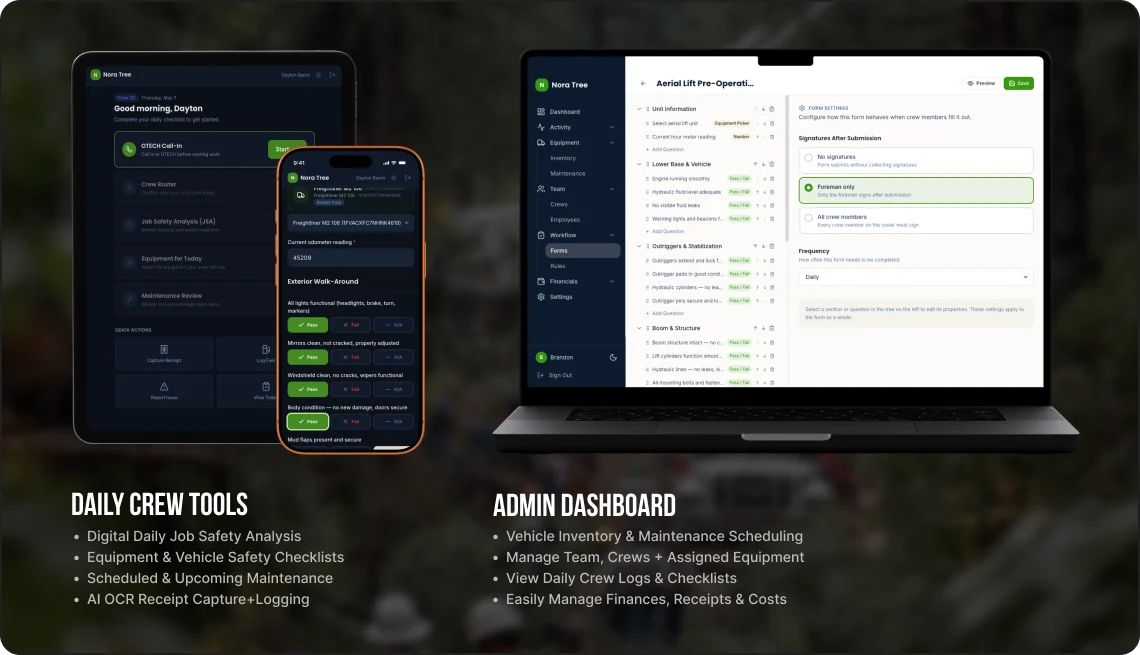
Most field-ops software is built for the office. Brandon’s crew fills it out covered in mulch with chainsaw chaps still on. The brief was simple: rebuild the daily routine from the truck seat backwards, then give the office whatever falls out of that. This is what fell out.
- Understanding the crew’s daily routine and the office’s reconciliation work
- Product and interaction design for the crew side and the admin dashboard
- The build: Next.js, Supabase, Vercel, Tailwind
- Data migration: the equipment and driver records
- Brandon, the owner: priorities, sign-off, and the form templates he edits himself
- Dayton, the general foreman: [what the field side contributed]
- [Anyone else involved: the accountant, the crew leads]
How I worked with them: “Bring me your ideas. Seriously, I am making this for you. How do you want it to work?”
The stack Brandon already had.
The crew wasn’t the problem. The tools were too generic, and admin took an hour every night reconciling four sources to know what happened that day.
- Paper JSAs. Filled out at the yard, then forgotten on the dashboard. No record of who signed what.
- Versabit. $50/mo. Abandoned because nobody could onboard a crew member without a half-day of training.
- Samsara. $35/mo per truck. Gives location. Gives nothing else.
- Tupperware. A literal Tupperware on the office shelf, full of fuel receipts. The accountant’s least favorite drawer.
- A spreadsheet. One list of equipment. Half of it accurate. The other half in someone’s head.
One tool, four subscriptions retired.
I designed for the truck instead of the office, and shipped a single tool that replaced the whole stack. Every decision had to survive the same test: does this make a guy in gloves faster, or slower?
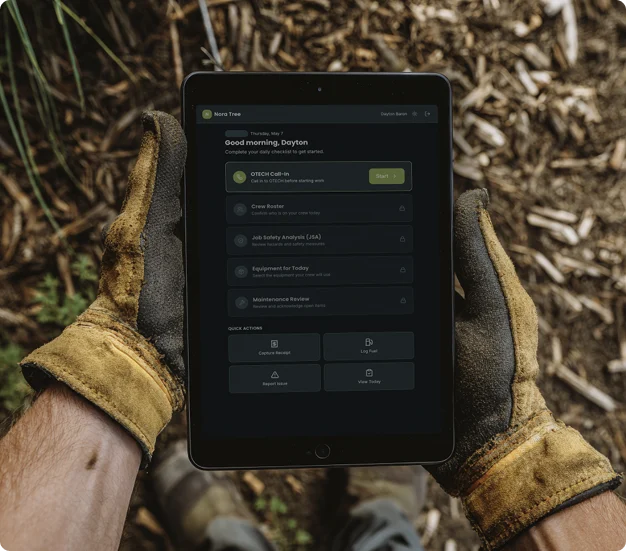
Designed for the truck.
Filled out each morning before the crew leaves the yard. 90 seconds, signed digitally, done.
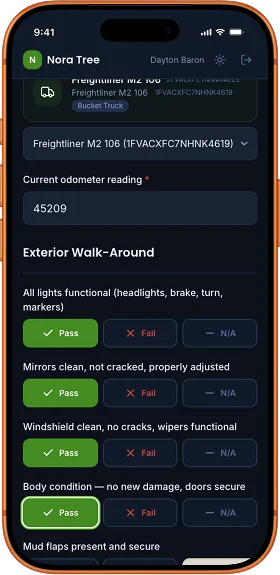
What makes it not suck on a worksite.
The crew uses this in gloves. Half of them have rural cell service. None of them want a forgotten password between them and a paying job.
Tap your name, enter a PIN
- Options
- Usernames, email and passwords; or tap your name and enter a short PIN.
- Why
- No usernames, no email, no “forgot password” at the yard.
- Trade-off
- [Less security than full accounts on a shared device; say how you scoped that risk.]
48px touch targets
- Options
- A standard, denser web UI; or targets sized for gloved hands.
- Why
- Gloves don’t do thumbnail-sized buttons.
- Trade-off
- [Less on each screen; where that forced extra steps.]
Camera-first capture
- Options
- Typed entry and file uploads; or open straight to the camera.
- Why
- Receipts, defect photos, and signatures land directly in storage. No copy-paste, no data URLs. AI parses the receipts.
- Trade-off
- [What happens with a bad photo or no signal, and how you handled it.]
Version-locked submissions
- Options
- Render old forms with the current template; or lock each submission to the template version it was signed on.
- Why
- When Brandon edits a form template, last week’s signed forms still render exactly as the crew filled them. OSHA likes that.
- Trade-off
- [Storing every template version adds complexity; was it worth it?]
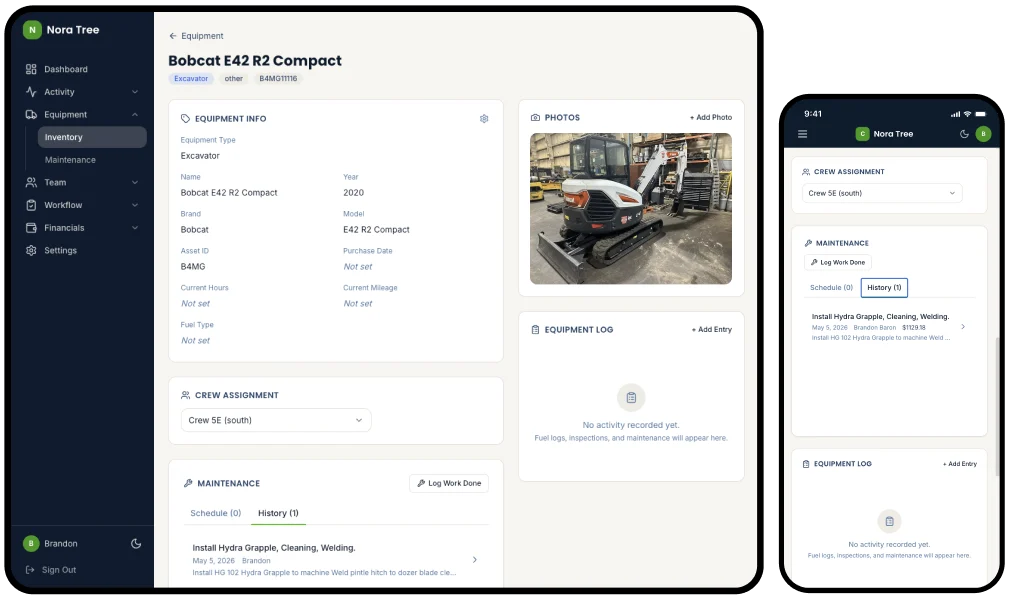
Manage the entire fleet.
43 pieces of equipment imported from Brandon’s insurance schedule on day three. Each one tracks its own maintenance schedule, parts costs, fuel logs, inspection history, and crew assignment.
“I can’t believe how simple this is compared to the other app we’ve tried before.”
“This is some seriously awesome sh!t.”
What I’d do differently
[One honest answer: something you’d design or build differently after watching the crew use it.]
Your business has its own Tupperware of receipts.
I build custom AI-assisted tools for small businesses: one tool, custom-fit, that replaces the stack of half-used SaaS subscriptions you’re paying for. If that sounds like you, let’s talk.